Deprecated: mb_strpos(): Passing null to parameter #1 ($haystack) of type string is deprecated in /autoinstalator/joomla/libraries/vendor/joomla/string/src/phputf8/mbstring/core.php on line 41
PstRotator Client

This mobile client app for PstRotator lets you control and rotate your antenna directly from your phone. It’s especially handy during servicing, repairs, or routine inspections — no need to go back and forth. Simply pull out your phone while standing next to the antenna and rotate it exactly the way you need. The app communicates with PstRotator via the Hamlib protocol for smooth and reliable operation.
Installation guide:
-
In PstRotator, open the Setup tab and enable the Rotctld Hamlib Server.
-
Optionally, go to Communication -> Rotctld Server Setup to check or adjust the port settings.

On your phone, open the PstRotatorClient app, go to Settings (the three-star icon), and enter the IP address of the computer running PstRotator along with the port number.
That’s it for the installation. Please note, however, that this setup works locally. If you want to control the antenna when you are outside the range of your local Wi-Fi network, you need to enter your global (public) IP address instead of the local one. You can check your current public IP address using a service such as https://www.whatismyip.com/
Operation:
Tap Connect and the current antenna position should load (provided your rotor controller supports it). Select a preset position and tap Start to rotate.
-
If you long-press a preset, the current antenna position will be saved to that preset.
-
If you long-press one of the four quick presets, a dialog will open allowing you to change the value assigned to that button.
In the Settings (*** icon), you can adjust the tuning step size or disable elevation control.
App is available on GooglePlay
- Autor: SQ1GU
- Kategoria: Software
- Odsłon: 185
Privacy Policy — PstRotatorClient
Effective date: [2025-09-23]
PstRotatorClient (“we”, “our”, or “the App”) is a mobile client designed to control the PstRotator rotor software via the Hamlib protocol. This Privacy Policy explains what (if any) information the App collects, how it is used, and what control you have over that information. We take privacy seriously and strive to be transparent about our practices.
1. Summary
PstRotatorClient does not collect, store, or share any personal data from users. The App only sends commands to and receives status information from a PstRotator instance you run on your own computer or network.
2. Information the App May Use
-
Network configuration you enter: To connect to your PstRotator installation you must provide an IP address (local or public) and a port number within the App’s Settings. These values are stored locally on your device solely to establish the connection.
-
Rotor position/status: The App may read current antenna position or rotor status from your PstRotator instance to display it in the UI. This data is transmitted between your device and your PstRotator server at run time and is not stored by us.
3. Data Collection and Storage
-
The App does not collect or transmit personal information (such as your name, email, device identifiers, or location) to any external servers.
-
All configuration data (IP address, port, and optionally presets) is stored locally on your device. It is not uploaded to any third-party service.
4. Third-Party Services
-
The App does not use third-party analytics, advertising, or crash-reporting services.
-
The App communicates only with the PstRotator instance you specify. Any routing through or exposure to external networks (for remote access) depends on your network configuration and router settings, not on the App.
5. Remote Access and Your Responsibility
If you choose to control PstRotator from outside your local network:
-
You must use your public IP address (or another remote-access method) and open/forward the chosen port on your router.
-
Enabling remote access may expose your PstRotator server to the internet. You are responsible for securing your network, using strong router settings, and understanding the risks of opening ports.
6. Security
We design the App to minimize data handling. Nevertheless, no method of transmission or storage is completely secure. We cannot guarantee absolute security of data exchanged between your device and your PstRotator server. Use secure network practices when enabling remote access.
7. Children
The App is not directed at children under 13. We do not knowingly collect personal data from children.
8. Changes to This Policy
We may update this Privacy Policy from time to time. If we make material changes, we will update the effective date at the top of this page.
9. Contact
If you have questions or requests regarding this Privacy Policy, please contact:
[
- Autor: SQ1GU
- Kategoria: Software
- Odsłon: 198

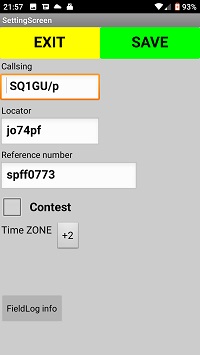
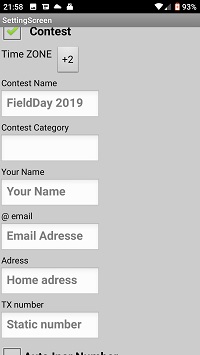
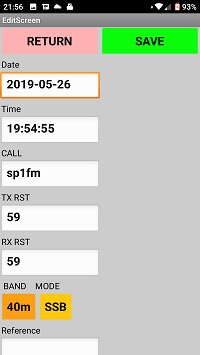
FieldLog is an Android phone application for recording QSO during holidays, nature trips.FieldLog is an Android phone application for recording QSO during holidays, nature trips.
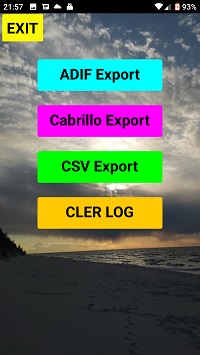
In the program, we can easily register connections during our activation FloraFauna, IOTA, SOTA, Castle, Lighthouse etc. Field Log is also a program to work in contest such as FieldDay, GreenDay or others.The program has the function of checking double qso and exporting to ADIF, Cabrillo and CSV files.
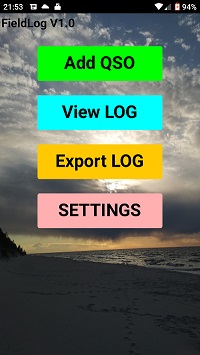
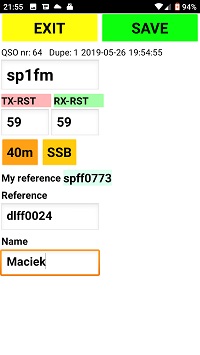
FieldLog is available in the GooglePlay store.
https://play.google.com/store/apps/details?id=appinventor.ai_goralla_kg.FieldLog&gl=PL
Manual FieldLog V1.15 04.06.2021
- Autor: SQ1GU
- Kategoria: Software
- Odsłon: 2911